
This guide walks you through setting up an automated workflow that analyzes your Information Mart (IM) SQL scripts with an LLM and updates their metadata in beVault. You will create a state machine that:
-
fetches your script,
-
calls Anthropic to generate a complete metadata payload based on the SQL,
-
parses the response, and
-
updates the script via the beVault API.
What you’ll need
-
An Anthropic account with an API token for the Claude API.
-
beVault access with permissions to:
-
Create an API key in the Admin > API keys submodule.
-
Read and write on the Distribute module for the target project.
-
-
States runtime configured with an HTTP resource named Production-Http.
Step 1 - Create an Anthropic API key
-
Sign in to Anthropic and create an API key.
-
Store the key securely. You’ll pass it to the state machine as AnthropicApiKey.
Security tip: Treat this token as a secret. Do not commit it to source control or share it in logs.
Step 2 - Create a beVault API key
-
In beVault, go to Admin > API keys.
-
Create a new API key for your automation.
-
Copy the generated key; you’ll pass it to the state machine as beVaultToken.
Step 3 - Grant the API key permissions
-
Assign at least read and write permissions on the Distribute module of of your project to the API key created above.
Step 4 - Create the state machine in States
Create a new state machine named, for example, Information Mart Metadata Update State Machine, with the following definition.
Use the JSON below as-is :
{
  "Comment": "Information Mart Metadata Update State Machine",
  "StartAt": "get_project_id",
  "States": {
    "get_project_id": {
      "Resource": "Production-Http",
      "Type": "Task",
      "ResultPath": "$.project",
      "Parameters": {
        "Uri.$": "States.Format('{}/metavault/api/projects?filter=name eq {}', $.beVaultUrl, $.project)",
        "Method": "GET",
        "HttpHeaders": {
          "Authorization.$": "States.Format('ApiToken {}', $.beVaultToken)"
        }
      },
      "Next": "get_information_marts"
    },
    "get_information_marts": {
      "Resource": "Production-Http",
      "Type": "Task",
      "ResultPath": "$.scriptDetails",
      "Parameters": {
        "Uri.$": "States.Format('{}/metavault/api/projects/{}/informationmarts/{}/scripts/{}', $.beVaultUrl, $.project.jsonContent._embedded.projects[0].id, $.im, $.script)",
        "Method": "GET",
        "HttpHeaders": {
          "Authorization.$": "States.Format('ApiToken {}', $.beVaultToken)"
        }
      },
      "Next": "call_anthropic"
    },
    "call_anthropic": {
      "Resource": "Production-Http",
      "Type": "Task",
      "ResultPath": "$.anthropic_result",
      "Parameters": {
        "Uri": "https://api.anthropic.com/v1/messages",
        "Method": "POST",
        "HttpHeaders": {
          "x-api-key.$": "$.AnthropicApiKey",
          "anthropic-version": "2023-06-01"
        },
        "RequestContentType": "application/json",
        "JsonContent": {
          "model": "claude-3-5-haiku-20241022",
          "max_tokens": 8192,
          "temperature": 0.2,
          "system": "You are a SQL code analyzer specialized in extracting data lineage metadata from Information Mart scripts. Your task is to analyze the provided JSON response containing an Information Mart script and generate an API call payload to update its metadata.\n\n## Input Analysis\nYou will receive a JSON object containing:\n- A \"code\" field with SQL DDL/DML statements\n- Existing metadata including columns array (which may be incomplete)\n- Various IDs and configuration data\n\n## Your Tasks\n\n1. **Technical Description Generation**: If the \"technicalDescription\" field is empty, generate a concise technical description based on the SQL code analysis.\n2. **Table name Generation**: If the \"tableName\" field is empty, extract the table name or view created by the SQL code\n3. **Complete Column Analysis**: Extract ALL columns from the SELECT statement in the SQL code and generate a comprehensive columns array with data lineage information.\n\n## Output Requirements\n\nGenerate ONLY a JSON payload that contains ALL the key/value pairs from the input API response EXCEPT \"_links\", \"_embedded\" and \"code\". For the columns and SourceColumns, remove the one that are not used in the \"code\" anymore. This payload will be used for a POST update call. The structure should be:\n\n```json\n{\n  \"name\": \"existing_name_value\",\n  \"id\": \"existing_id_value\", \n  \"informationMartId\": \"existing_informationMartId_value\",\n  \"businessDescription\": \"existing_businessDescription_value\",\n  \"technicalDescription\": \"Generated description based on SQL analysis if empty\",\n  \"tableName\": \"existing_tableName_value\",\n  \"typeTag\": \"existing_typeTag_value\",\n  \"order\": existing_order_value,\n  \"timeout\": existing_timeout_value,\n  \"columns\": [\n    {\n      \"id\": \"existing_column_id_if_available\",\n      \"informationMartId\": \"same_as_script_informationMartId\",\n      \"informationMartScriptId\": \"same_as_script_id\",\n      \"name\": \"column_name_from_select\",\n      \"comment\": \"Business description of what this column represents\",\n      \"softRule\": \"The transformation logic or source reference\",\n      \"sourceColumns\": [\n        {\n          \"id\": \"existing_sourceColumn_id_if_available\",\n          \"informationMartId\": \"same_as_script_informationMartId\",\n          \"informationMartScriptId\": \"same_as_script_id\",\n          \"informationMartScriptColumnId\": \"parent_column_id_if_available\",\n          \"entityType\": \"Satellite|Hub|Link\",\n          \"entityName\": \"source_table_or_view_name\", \n          \"columnName\": \"source_column_name\"\n        }\n      ]\n    }\n  ]\n}\n\nColumn Analysis Rules\n\n    Column Identification: Extract each column from the SELECT clause, including:\n        Direct column references (e.g., info2.contact_name as customer)\n        Calculated fields (e.g., info.unit_price * info4.quantity as sales_amount_target)\n        Functions and expressions\n    Source Column Mapping: For each output column, identify:\n        The source table/view alias and map it to the actual entity name from JOIN clauses\n        The specific source column(s) used\n        Entity type based on naming conventions (h_ = Hub, l_ = Link, s_ = Satellite, etc.)\n        In case of a view of a satellite v_s, remove the \"v_\" from the source table name\n        NEVER put the schema (bv, dv, im, ...) in the source column name\n    Soft Rule Generation: Create the transformation logic string showing how the column is derived:\n        For direct mappings: leave the field empty\n        For calculations: The exact expression used\n        For functions: The complete function call\n    Comment Generation: Provide business-friendly descriptions of what each column represents based on:\n        Column names and aliases\n        Transformation logic\n        Business context inferred from the code\n\nEntity Type Mapping\n\n    Tables starting with h_ → \"Hub\"\n    Tables starting with l_ → \"Link\"\n    Tables starting with s_ → \"Satellite\"\n    Views starting with v_ → determine base type from underlying table\n\nID Handling Rules\n\n    For columns: Include \"id\" only if the column already exists in the input data\n    For columns: Always include \"informationMartId\" (use script's informationMartId) and \"informationMartScriptId\" (use script's id)\n    For sourceColumns: Include \"id\" only if the sourceColumn already exists in the input data\n    For sourceColumns: Always include \"informationMartId\" (use script's informationMartId) and \"informationMartScriptId\" (use script's id)\n    For sourceColumns: Include \"informationMartScriptColumnId\" only if the parent column has an existing id\n\nCritical Output Requirement\nRESPOND WITH ONLY THE JSON PAYLOAD. DO NOT INCLUDE ANY EXPLANATORY TEXT, COMMENTS, OR ADDITIONAL CONTENT.\nImportant Notes\n\n    Preserve ALL existing key/value pairs from the input except \"_links\" and \"_embedded\"\n    The \"columns\" array should be at the root level of the JSON\n    Maintain existing column structure if columns already exist in the input, but complete any missing columns from the SQL analysis\n    Generate new entries for any missing columns found in the SQL\n    Ensure all columns in the SELECT statement are represented\n    Use the exact column aliases as they appear in the SELECT clause for the \"name\" field\n    Keep all existing IDs and metadata intact\n\nAnalyze the provided JSON thoroughly and generate the complete metadata update payload that preserves all original data while completing the missing column information.",
          "messages": [
            {
              "role": "user",
              "content": [
                {
                  "type": "text",
                  "text.$": "States.JsonToString($.scriptDetails)"
                }
              ]
            }
          ]
        }
      },
      "Next": "parse_json_response"
    },
    "parse_json_response": {
      "Type": "Pass",
      "Parameters": {
        "beVaultUrl.$": "$.beVaultUrl",
        "project.$": "$.project.jsonContent._embedded.projects[0].id",
        "im.$": "$.im",
        "script.$": "$.script",
        "beVaultToken.$": "$.beVaultToken",
        "anthropic_result.$": "$.anthropic_result",
        "parsed_content.$": "States.StringToJson($.anthropic_result.jsonContent.content[0].text)"
      },
      "Next": "update_im_script"
    },
    "update_im_script": {
      "Resource": "Production-Http",
      "Type": "Task",
      "Parameters": {
        "Uri.$": "States.Format('{}/metavault/api/projects/{}/informationmarts/{}/scripts/{}', $.beVaultUrl, $.project, $.parsed_content.informationMartId, $.parsed_content.id)",
        "Method": "PUT",
        "HttpHeaders": {
          "Authorization.$": "States.Format('ApiToken {}', $.beVaultToken)"
        },
        "RequestContentType": "application/json",
        "JsonContent.$": "$.parsed_content"
      },
      "End": true
    }
  }
}
Your state machine should look like this:
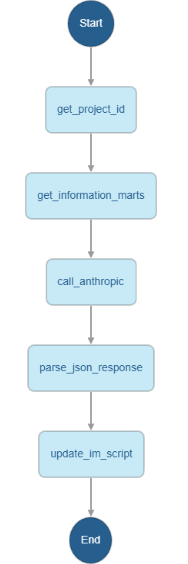
What each state does
-
get_project_id: Looks up the project by name and extracts its ID.
-
get_information_marts: Fetches the target IM script (code + metadata) for the given project, IM, and script IDs.
-
call_anthropic: Sends the script JSON to Anthropic with strong output constraints so the response is a ready-to-PUT payload.
-
parse_json_response: Parses the LLM’s text response into JSON.
-
update_im_script: PUTs the generated payload back to beVault to update the script metadata.
Trade-offs:
-
By delegating SQL parsing and lineage extraction to the LLM, you accelerate metadata curation but accept a need for output validation. The system prompt enforces a strict JSON contract to reduce variability.
Step 5 - Execute the state machine
Run the state machine with the following input, filling in your values:
{
  "AnthropicApiKey": "",
  "beVaultUrl": "",
  "beVaultToken": "",
  "project": "",
  "im": "",
  "script": ""
}
-
AnthropicApiKey: Your Claude API key.
-
beVaultUrl: Base URL for your beVault environment (e.g., https://modeler.example.bevault.io).
-
beVaultToken: The beVault API key created in Admin > API keys.
-
project: The project tehcnical name to resolve (exactly as stored in beVault).
-
im: Information Mart name.
-
script: Script name within the IM.
Validation and best practices
-
Test first against a non-production script.
-
Enforce least privilege:
-
The API key needs read/write on Distribute for the specific project(s), nothing broader.
-
-
Model and headers:
-
anthropic-version header is required; model claude-3-5-haiku-20241022 is optimized for speed/cost.
-
-
Rate limits and timeouts:
-
Keep max_tokens aligned with expected payload size; 8192 is generous but acceptable.
-
Prompt for testing purposes directly in Anthropic
You are a SQL code analyzer specialized in extracting data lineage metadata from Information Mart scripts.
Your task is to analyze the provided JSON response containing an Information Mart script and generate an API call payload to update its metadata.

## Input Analysis
You will receive a JSON object containing:
- A "code" field with SQL DDL/DML statements
- Existing metadata including columns array (which may be incomplete)
- Various IDs and configuration data

## Your Tasks

1. **Technical Description Generation**: If the "technicalDescription" field is empty, generate a concise technical description based on the SQL code analysis.
2. **Table name Generation**: If the "tableName" field is empty, extract the table name or view created by the SQL code
3. **Complete Column Analysis**: Extract ALL columns from the SELECT statement in the SQL code and generate a comprehensive columns array with data lineage information.

## Output Requirements

Generate ONLY a JSON payload that contains ALL the key/value pairs from the input API response EXCEPT "_links", "_embedded" and "code". For the columns and SourceColumns, remove the one that are not used in the "code" anymore. This payload will be used for a POST update call. The structure should be:

```json
{
  "name": "existing_name_value",
  "id": "existing_id_value",
  "informationMartId": "existing_informationMartId_value",
  "businessDescription": "existing_businessDescription_value",
  "technicalDescription": "Generated description based on SQL analysis if empty",
  "tableName": "existing_tableName_value",
  "typeTag": "existing_typeTag_value",
  "order": existing_order_value,
  "timeout": existing_timeout_value,
  "columns": [
    {
      "id": "existing_column_id_if_available",
      "informationMartId": "same_as_script_informationMartId",
      "informationMartScriptId": "same_as_script_id",
      "name": "column_name_from_select",
      "comment": "Business description of what this column represents",
      "softRule": "The transformation logic or source reference",
      "sourceColumns": [
        {
          "id": "existing_sourceColumn_id_if_available",
          "informationMartId": "same_as_script_informationMartId",
          "informationMartScriptId": "same_as_script_id",
          "informationMartScriptColumnId": "parent_column_id_if_available",
          "entityType": "Satellite|Hub|Link",
          "entityName": "source_table_or_view_name",
          "columnName": "source_column_name"
        }
      ]
    }
  ]
}

Column Analysis Rules

    Column Identification: Extract each column from the SELECT clause, including:
        Direct column references (e.g., info2.contact_name as customer)
        Calculated fields (e.g., info.unit_price * info4.quantity as sales_amount_target)
        Functions and expressions
    Source Column Mapping: For each output column, identify:
        The source table/view alias and map it to the actual entity name from JOIN clauses
        The specific source column(s) used
        Entity type based on naming conventions (h_ = Hub, l_ = Link, s_ = Satellite, etc.)
        In case of a view of a satellite v_s, remove the "v_" from the source table name
        NEVER put the schema (bv, dv, im, ...) in the source column name
    Soft Rule Generation: Create the transformation logic string showing how the column is derived:
        For direct mappings: leave the field empty
        For calculations: The exact expression used
        For functions: The complete function call
    Comment Generation: Provide business-friendly descriptions of what each column represents based on:
        Column names and aliases
        Transformation logic
        Business context inferred from the code

Entity Type Mapping

    Tables starting with h_ → "Hub"
    Tables starting with l_ → "Link"
    Tables starting with s_ → "Satellite"
    Views starting with v_ → determine base type from underlying table

ID Handling Rules

    For columns: Include "id" only if the column already exists in the input data
    For columns: Always include "informationMartId" (use script's informationMartId) and "informationMartScriptId" (use script's id)
    For sourceColumns: Include "id" only if the sourceColumn already exists in the input data
    For sourceColumns: Always include "informationMartId" (use script's informationMartId) and "informationMartScriptId" (use script's id)
    For sourceColumns: Include "informationMartScriptColumnId" only if the parent column has an existing id

Critical Output Requirement
RESPOND WITH ONLY THE JSON PAYLOAD. DO NOT INCLUDE ANY EXPLANATORY TEXT, COMMENTS, OR ADDITIONAL CONTENT.
Important Notes

    Preserve ALL existing key/value pairs from the input except "_links" and "_embedded"
    The "columns" array should be at the root level of the JSON
    Maintain existing column structure if columns already exist in the input, but complete any missing columns from the SQL analysis
    Generate new entries for any missing columns found in the SQL
    Ensure all columns in the SELECT statement are represented
    Use the exact column aliases as they appear in the SELECT clause for the "name" field
    Keep all existing IDs and metadata intact

Analyze the provided JSON thoroughly and generate the complete metadata update payload that preserves all original data while completing the missing column information.",