
The first Data Vault 2.0 certified tool!
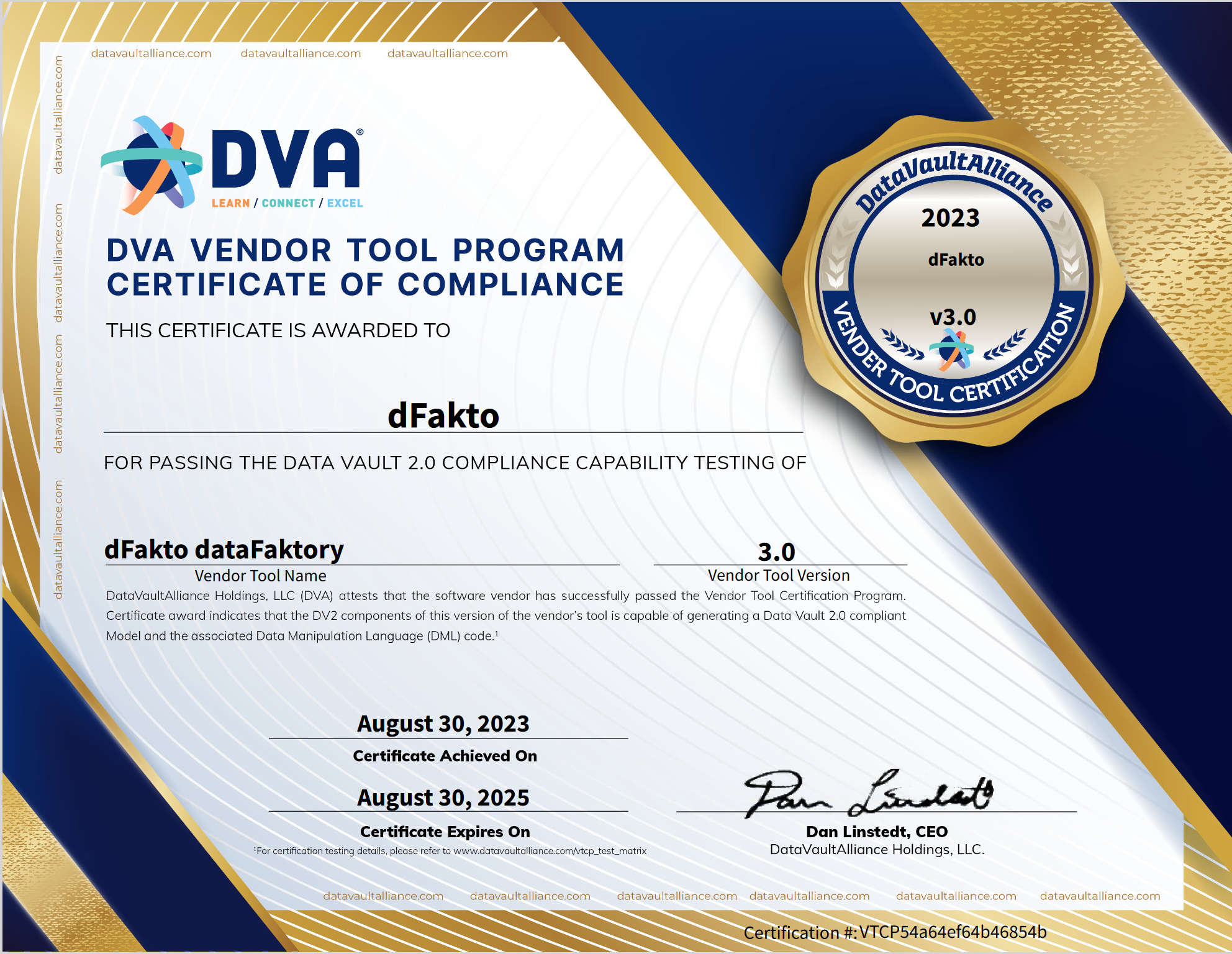
With the release of version 3.0, beVault becomes the first – and currently the only – tool to achieve the Data Vault 2.0 certification by the Data Vault Alliance. This milestone was reached after successfully passing the rigorous criteria of the Vendor Tool Certification Program https://datavaultalliance.com/certified-software-tools/.
What does this certification mean?
Achieving the status of a Data Vault Certified Tool signifies that beVault meticulously adheres to the Data Vault 2.0 standards established by the Data Vault Alliance (https://datavaultalliance.com/). This certification is a testament to our tool's capability to generate data models that are not just compliant but also optimized for the Data Vault 2.0 methodology, ensuring reliability and excellence in your data management.
Why is it important?
The Data Vault methodology, with its 20-year history, has been recognized as one of the most effective frameworks for creating a flexible, scalable, consistent, and adaptable enterprise data warehouse. Adherence to its principles is crucial; deviation may lead to short-term success, but can compromise long-term scalability and adaptability.
beVault is designed to simplify your Data Vault implementation by providing a user-friendly interface and generating all the tables and processes for you. Being certified is the guarantee that all the magic behind the tool is aligned with the standard. This ensures that your data warehouse remains scalable and flexible, future-proofing your data infrastructure.
I already have a beVault, will it be certified?
Yes! Upholding our philosophy of standard adherence, we ensure that all our users can benefit from a certified Data Vault. If you already have a beVault before this version, a migration process will be executed to bring your current projects in line with the latest certified standards.
To facilitate a smooth transition, please refer to our migration guide: beVault 3.0 - Impact and migration. This guide will assist you in preparing your beVault for an automatic update, ensuring your projects are not only updated but also fully compliant with the Data Vault 2.0 standards.
Snowflake support

In this release, we included full-support of Snowflake in our brand-new Query Engine. This allows you to deploy your beVault project on your snowflake environment. All the tables and views will be created directly in your snowflake database.
In addition, we created a dedicated Store for Snowflake that you can use in your state machine to either extract data from a Snowflake database or load data in the staging tables of your project.
Licenses
In our continuous effort to make your user experience better, we have implemented a new licensing module in beVault version 3.0. This innovative module, accessible directly in the client admin area, offers a more transparent and detailed overview of your beVault plan. It's designed to make understanding and managing your licenses more intuitive and user-friendly.
List of changes
-
New License module
-
Snowflake support
-
Allow to deploy a project on a Snowflake database
-
Add a store to connect to a Snowflake database
-
-
Version - Review version deployment
-
Allow a user to download the deployment script
-
-
Orchestrator
-
Review orchestrator workflows
-
-
New Query Engine for the VTCP
-
Build
-
Replaced the context satellites with the effectivity satellites
-
Add an option to ignore the case of the business key
-
-
Source
-
Hard rules
-
Change how parameters are passed to the hard rule
-
-
Remove multi-active satellite support
-
-
Verify
-
Change how parameters are passed to the data quality control
-
Rework of the computation of the data quality controls
-
-
Database
-
Global
-
rework snapshot tables. There is now a table in the schema im per snapshot instead of having all of them in ref.snapshot_dates
-
Some naming conventions and target schema changed
-
Changed ghost records to align with Data Vault 2.0 standard
-
Views to transfer data from one table to another are now deployed in the target schema
-
-
“stg” schema
-
Add staging level2 tables where hash keys and hard rules are computed
-
-
“meta” schema
-
Add schema conventions in meta.schema_conventions
-
Add table naming conventions in meta.table_conventions
-
Add column naming conventions in meta.column_conventions
-
Add data lineage in meta.data_flows
-
Add a list of entities in meta.tables
-
Add a list of columns of the entities in meta.table_columns
-
-
-
-
Several UI improvements
-
Bug fixing
-
Multiple bug fixing in the submodule Build - Graph Editor
-
Remove data linked to deleted snapshots from data quality results
-
Fix an issue with staging table containing columns in uppercase
-
Fix Sentry integration
-
Fix health checks
-
Components' version
|
Component |
Version |
|---|---|
|
Metavault |
3.0.0 🆙 |
|
States |
1.5.7 |
|
Workers |
1.7.2 |
|
UI |
1.2.0 🆕 |
Migration deployment actions
This section centralizes all actions to be performed by the party to guarantee the success of the migration.
Enforce lowercase on PostgreSQL deployments
See full documentation here: Supported target database configuration
On migrating from a 2.X environment make sure to set the following variable:
"DFAKTO_METAVAULT_SERVERS__<the psql server name>__EngineParameters__FORCE_LOWERCASE":true
This will make sure the format of identifiers continues to be computed as in 2.X
Adapt PostgreSQL Database type
See details here : https://dfakto.atlassian.net/l/cp/4wddhyCH
By default, a “PostgreSQL" typed database will generate queries for major Postgres versions 12 to 14. To use queries for 15+ use the setting "PostgreSQL15" in the DatabaseType setting.
So, for all configured databases using Postgresql 15.0 or higher, use the PostgreSQL15 database type.
Setup licensing
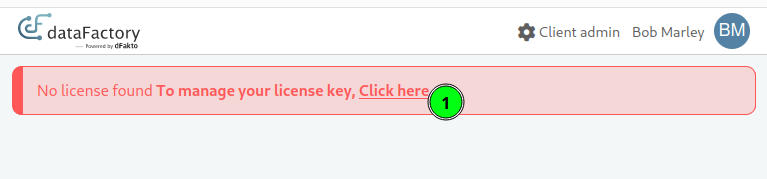
After successful migration, access the interface with an Admin User.
-
Access License Manager
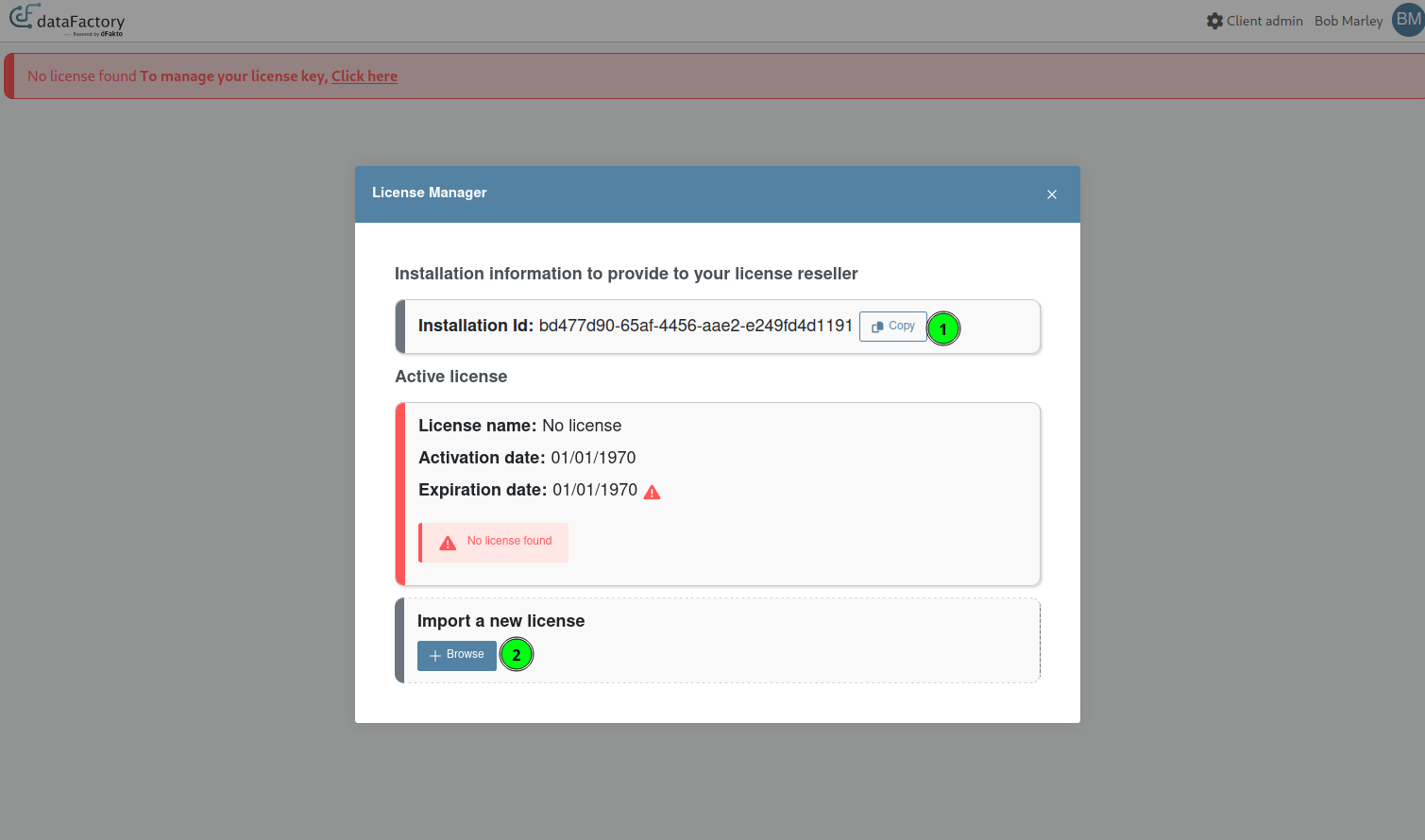
-
Retrieve Unique installation Id from the license widget.
-
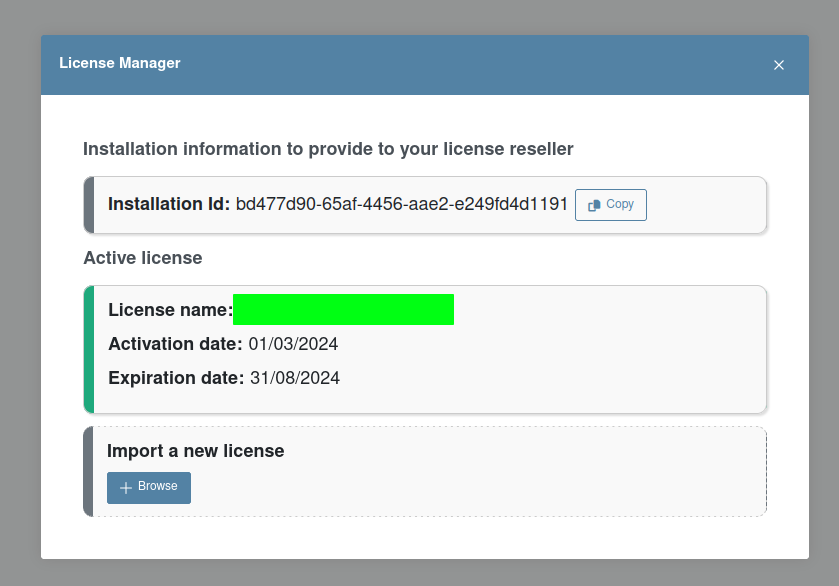
Generate/ask for a license and upload it.
(Optional) Activate Constraint and Index drop on ghost record migration
It has been observed that inserting new entries in links that have modified hashkeys, due to ghost record changes, cause some significant delays in the migration of some large databases. To speed up the write operation, it is possible to configure beVault to perform a temporary drop of indexes and constraints before this operation. Use the following environment variable to activate this behaviour. (Only supported on PostgreSql, otherwise ignored)
"DFAKTO_METAVAULT_migration30__dropLinkRelConstraintsDuringGhostRecordInsert": "true"
(Optional) Activate Query Logging for migration
If the need arises to get a full report of queries executed on environments (during migrations or other), the activation of the following environment variable may be useful:
"DFAKTO_METAVAULT_Serilog__MinimumLevel__Override__dFakto.DataVault2.Core.Tools.QueryLogger": "Debug"
It sets the logging level of the global QueryLogger in the application to “Debug“, which outputs all queries to the logs. (Not only migration queries, so you may want to disable it afterwards.)
(Optional, 3.0.9+) Fix previous 3.0 migration: datapackage tables based on views
When migrating from 2.X to any version between 3.0.0 and 3.0.8, a bug caused VIEWS to be changed to TABLES. This was fixed in 3.0.9. For metavaults already at version 3.0.0 - 3.0.8: An optional override has been introduced as part of the 3.0.9 migration, should you want the metadata of these DP tables fixed:
"DFAKTO_METAVAULT_migration309__fixSelectQueryToViewDatapackages": "true"
If this option is active, for all DP tables that:
-
Are a table now.
-
Have been affected by a previous 3.0 migration (the bug is present).
-
Are based on a Query, that is a SELECT query. (So they are obviously broken)
They are converted back to a VIEW.
This does not change the deployed environments in any way. If you want this to affect the actual data, you will need to:
-
Delete objects that are tables, but should be views.
-
Re-deploy.
Otherwise, their is a high likelihood that on deploy, depending on DB type, the metavault:
-
Considers the table already exists, so does nothing
-
Tries to drop a VIEW that is actually a TABLE
-
Tries to CREATE VIEW, when a table from the same name exists already.
Fix Versions
| Title | Release | Release Date | Status | UI Version | Metavault Version | States Version | Workers Version | Summary |
|---|---|---|---|---|---|---|---|---|
| Release note - beVault 3.9.1 |
3.9.1 |
Released |
1.11.2 |
5.2.0 🆙 |
2.3.0 |
1.11.2 |
|
|
| Release note - beVault 3.11.1 |
3.11.1 |
Released |
1.15.0 🆙 |
5.6.0 🆙 |
2.6.0 🆙 |
2.1.0 |
Add support for distinct endpoints for back-end and front-end components Minor bug fixing |
|
| Release note - beVault 3.9.7 |
3.9.7 |
Released |
1.11.2 |
5.3.2 🆙 |
2.3.3 🆙 |
1.12.1 |
|
|
| Release note - beVault 3.12.2 |
3.12.2 |
Released |
1.16.2 |
6.1.1 🆙 |
2.6.0 |
2.1.1 |
|
|
| Release note - beVault 3.9.6 |
3.9.6 |
Released |
1.11.2 |
5.3.0 🆙 |
2.3.2 🆙 |
1.12.1 |
|
|
| Release note - beVault 3.8.1 |
3.8.1 |
Released |
1.10.1 🆙 |
5.0.0 |
2.3.0 |
1.11.2 |
Source Module
Graph Editor
|
|
| Release note - beVault 3.10.1 |
3.10.1 |
Released |
1.13.1 🆙 |
5.4.0 🆙 |
2.4.0 |
2.0.0 |
Bux fixing and minor improvements |
|
| Release note - beVault 3.8.2 |
3.8.2 |
Released |
1.10.2 🆙 |
5.0.1 🆙 |
2.3.0 |
1.11.2 |
|
|
| Release note - beVault 3.9.5 |
3.9.5 |
Released |
1.11.2 |
5.2.4 🆙 |
2.3.1 🆙 |
1.12.1 🆙 |
|
|
| Release note - beVault 3.13.1 |
3.13.1 |
Released |
1.17.0 |
6.2.1 🆙 |
2.7.2 |
3.0.0 |
|
|
| Release note - beVault 3.9.3 |
3.9.3 |
Released |
1.11.2 |
5.2.2 🆙 |
2.3.0 |
1.12.0 🆙 |
|
|
| Release note - beVault 3.9.2 |
3.9.2 |
Released |
1.11.2 |
5.2.1 🆙 |
2.3.0 |
1.11.2 |
|
|
| Release note - beVault 3.12.1 |
3.12.1 |
Released |
1.16.2 🆙 |
6.1.0 |
2.6.0 |
2.1.1 |
Fix an issue with the technical name of the satellite |
|
| Release note - beVault 3.9.4 |
3.9.4 |
Released |
1.11.2 |
5.2.3 🆙 |
2.3.0 |
1.12.0 |
|
|
| Release note - beVault 3.8.3 |
3.8.3 |
Released |
1.10.2 |
5.0.2 🆙 |
2.3.0 |
1.11.2 |
|