
Release note - beVault 3.13
We are pleased to announce the release of beVault 3.13, bringing a redesigned graph experience in the Build module, improved support for large projects, easier workflow configuration in States, and a series of usability improvements across the platform.
Check out this release note to see what's new and stay tuned for new incoming releases in 2026 🚀
Focused graphs in Build
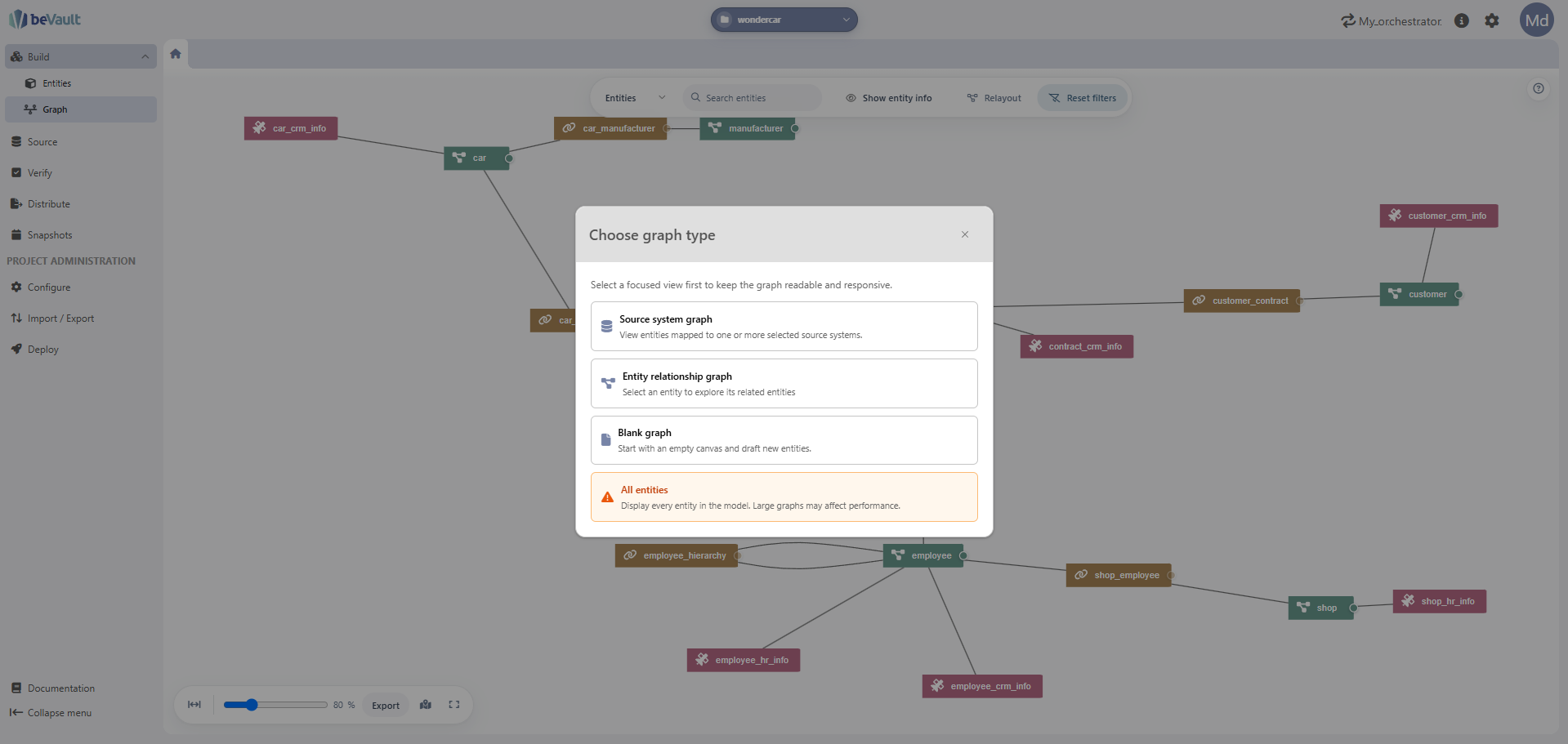
The graph experience in the Build module has been reworked to make it easier to explore models of any size. Instead of always rendering the complete graph, you can now choose the scope you want to display:
-
Source-system scope: Select one or more source systems and generate a graph limited to their entities.
-
Entity-centered scope: Start from a specific entity and display its neighbouring entities to explore the relevant part of the model.
-
Full graph: Display the complete graph, as in previous versions.
This more focused approach reduces the amount of content rendered at once and makes the graph easier to use in large projects, where displaying the entire model could previously affect performance. Teams can now benefit from graph-based exploration while keeping the view readable and responsive.
Discover all the new capabilities of the graph here: Graph Editor
Rename staging tables
Staging table names can now be updated after creation. This makes it easier to maintain clear naming conventions as a project evolves, without having to recreate the staging table.
List of changes
Build
-
Redesigned the graph experience with selectable scopes: source systems, an entity and its neighbours, or the complete graph Graph Editor
-
Added an in-graph documentation helper explaining how to create, connect, explore, and control graph elements
-
Added the possibility to select and move multiple entities together by holding Shift while dragging
-
Added the possibility to create draft links by connecting two hubs
-
Prefilled technical names when creating entities from drafts
-
Prefilled business and technical link names when connecting two hubs
-
Added the possibility to see directly connected entities with the "Show neighbors" in the contextual menu of an entity
-
-
Added paging to the satellite tables in the dynamic tabs of Hubs and Links
-
Fixed the inability to close the modal used to manage Hub references
Source and modeling
-
Added the possibility to rename staging tables after creation
-
Added autocompletion for hard-rule definitions
Verify
-
Added autocompletion for Data Quality test queries
States
-
Added the possibility to execute multiple state machines State Machines | Execute multiple state machines
-
Added Git store configuration Git Store
-
Added SharePoint store configuration Sharepoint File Store
-
Improved the display of execution durations
-
Fixed the execution graph not refreshing while an execution was still running
Minor improvements
-
Added more validation to common forms
-
Improved the visibility of field rules and limitations before saving
⚠️ Warning — update your Docker Compose volume mappings before upgrading
beVault 3.13 changes the data folders used by the application. Before upgrading, update your Docker Compose file so that component volumes are mounted to /data instead of /var/lib/[component folder].
For example, replace a mapping such as:
volumes:
  - metavault-data:/var/lib/dfakto-metavault
with:
volumes:
  - metavault-data:/data
Apply this change for each affected beVault component before starting the new version. Keeping the old /var/lib/[component folder] mappings can prevent the application from finding its existing data after the upgrade.
Components' version
|
Component |
Version |
|---|---|
|
UI Version |
1.17.0 🆙 |
|
Metavault Version |
6.2.0 🆙 |
|
States Version |
2.7.2 🆙 |
|
States UI Version |
1.8.0 🆙 |
|
Workers Version |
3.0.0 🆙 |
|
MCP Version |
5.0.0 |
Fix Versions
| Title | Release | Release Date | UI Version | Metavault Version | States Version | States UI Version | Workers Version | Summary |
|---|