
Release note - beVault 3.12
We are pleased to announce the release of beVault 3.12, bringing meaningful improvements to data modeling flexibility, user experience, and database compatibility. This version focuses on freeing entities from database naming constraints, modernizing the execution interface, making content easier to share between users, and introducing full uppercase code generation — a significant step forward for IBM Db2 and Snowflake users.
Check out this release note to see what's new and stay tuned for new incoming releases in 2026 🚀
Business name for entities
beVault 3.12 introduces a business name for entities (Hubs, Links, Satellites, etc.), decoupled from the technical name used for database object generation. Until now, entity names were constrained by database naming rules — reserved characters, length limits, case sensitivity — which often forced teams to use abbreviated or technical names that were difficult to read for business users.
With this release, teams can define a clear, human-readable business name alongside the technical name, unlocking better collaboration between IT and business stakeholders without compromising the integrity of the generated data model.
-
Business-friendly naming: Use spaces, special characters, or longer descriptive names without worrying about database restrictions.
-
Technical name preserved: The database object (table, view) continues to be generated from the technical name, ensuring full backward compatibility.
-
Improved readability across the platform: Business names are surfaced throughout the beVault interface, making it easier to navigate and understand the model.
New execution page
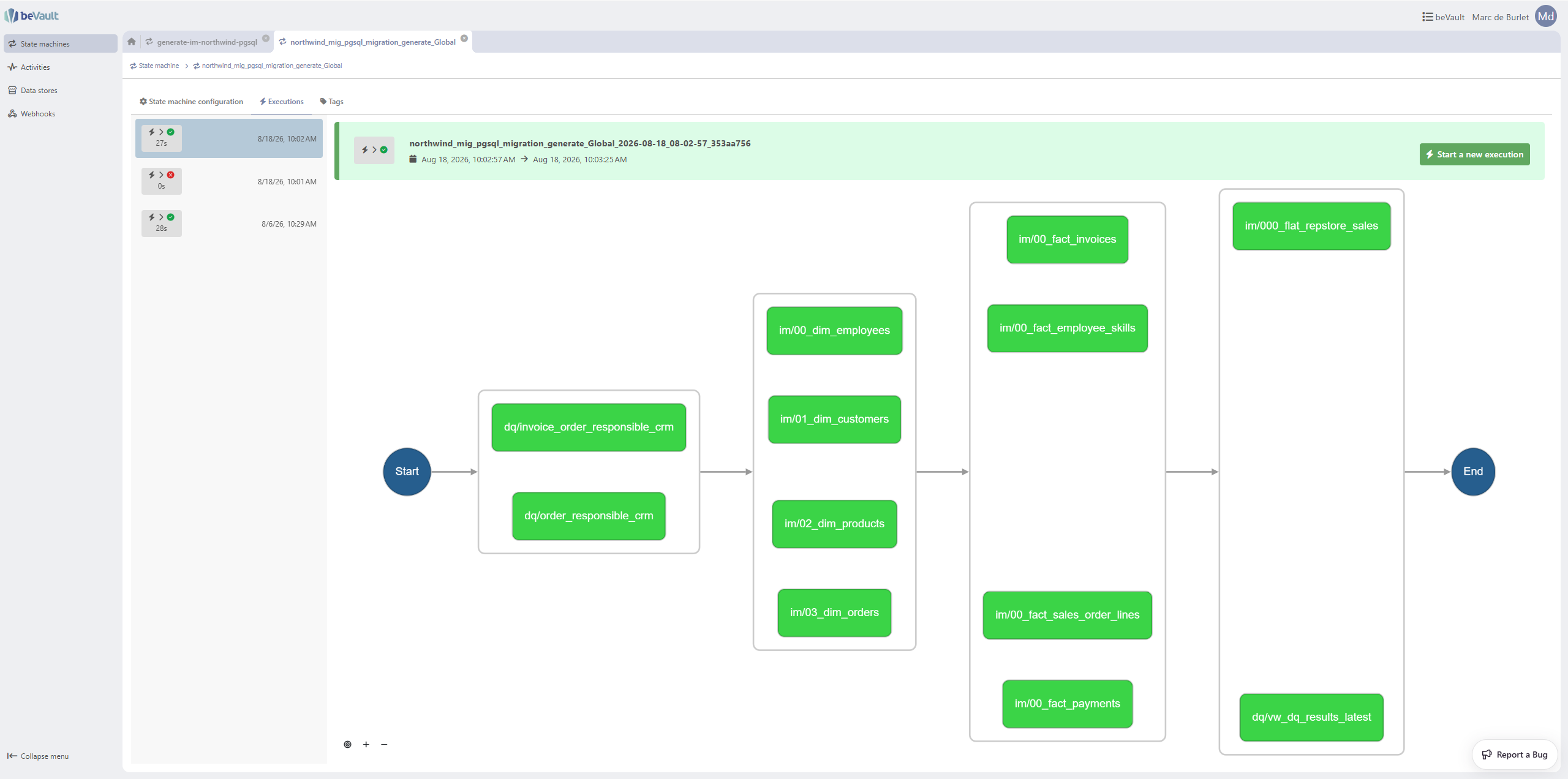
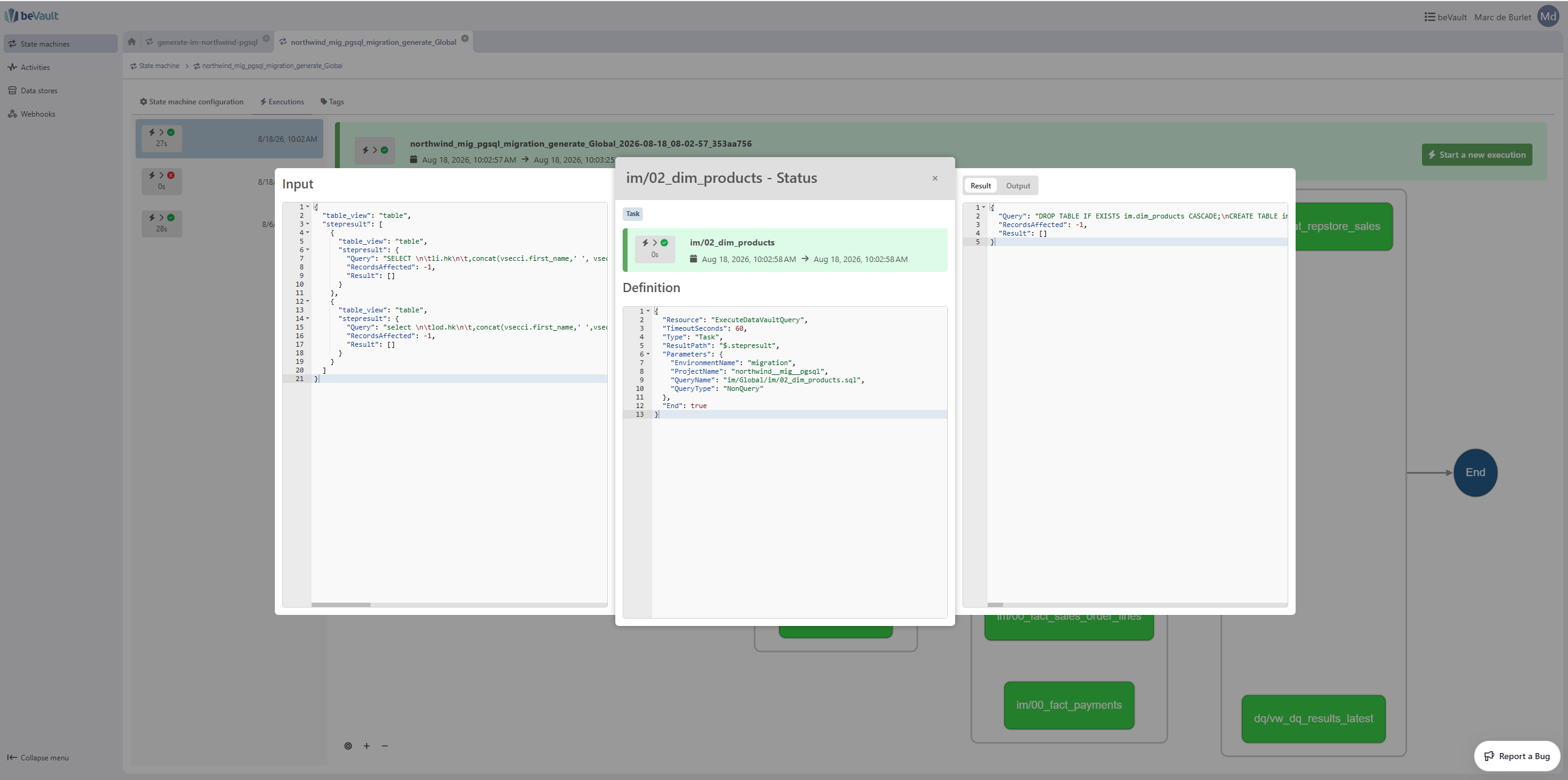
The execution experience in States has been fully redesigned. The new dedicated execution page provides significantly more space to display inputs, results, and outputs, and makes it much easier to monitor and troubleshoot data pipeline runs.
-
Flexible layout: The state machine management interface now features a new top-bar menu and a resizable, flexible layout — users can organize their workspace to match how they work.
-
Detailed execution view: The dedicated execution detail page displays step-level inputs, outputs, and status in a clear, spacious layout — no more cramped side panels.
-
Modernized interface: The redesigned pages align with the evolving look and feel of the beVault platform, delivering a more consistent and professional experience.
Shareable URL for dynamic tabs
beVault 3.12 makes it possible to share the URL of a dynamic tab directly with other users. Previously, navigating to a specific context — a particular entity, execution, or configuration screen — required manually reproducing the same navigation steps. This improvement makes collaboration faster and more reliable.
-
Copy and share: Users can now copy the URL of any dynamic tab and send it to a colleague, who will land directly on the same view.
Uppercase code generation
beVault 3.12 introduces a new naming convention — DFaktoUpper — that generates all database object names (schemas, prefixes, suffixes, and technical columns) in UPPERCASE.
This is particularly relevant for IBM Db2 and Snowflake users, where the standard guidelines recommend uppercase identifiers and where lowercase quoted names can lead to cumbersome double-quoting in every SQL query.
Two new environment variables control this behaviour:
-
DFAKTO_METAVAULT_CONVENTIONS__DefaultNamingConventions: Controls the casing of all auto-generated database object names. Set toDFaktoUpperto enable full uppercase generation. -
DFAKTO_METAVAULT_CONVENTIONS__AllowMixedCaseStagingTables: When set totrue, removes the enforcement of lowercasing staging table names, allowing mixed-case or fully uppercase staging table names.
|
Value |
Auto-generated parts (schema, prefix, suffix, technical columns) |
Generated mapping names |
|---|---|---|
|
|
lowercase |
UPPERCASE (A, B, …, AG, …) |
|
|
lowercase |
lowercase (a, b, …, ag, …) |
|
|
UPPERCASE |
UPPERCASE (A, B, …, AG, …) |
⚠️ Warning — changing this setting can break your existing project. beVault does not automatically migrate already-deployed database objects when the naming convention changes. Switching from
DFaktotoDFaktoUpperon an active project will cause beVault to create new uppercase schemas and tables alongside the existing lowercase ones, leaving the old data in place. Parts of your project containing custom SQL — such as staging table views, data quality controls, and Information Mart scripts — also require manual migration.Always make a full backup of both your beVault project and your target database before changing the naming convention.
👉 Follow the step-by-step migration guide to safely transition an existing project to the uppercase convention: Migrate your model to uppercase entities
List of changes
Modeling
-
New business name field available for all entity types (Hubs, Links, Satellites, PITs)
-
Business name displayed throughout the beVault interface, decoupled from the technical database name
-
The type “Hierarchy” for the link is now purely informative, the restrictions related to the hub references have been lifted
-
Increased the limit for the length of the hub references to 50
Execution (States UI)
-
New flexible layout and top-bar menu for state machine management
-
New execution selector for easier navigation between active and past executions
-
New dedicated execution detail page with step-level inputs, outputs, and status
UI
-
Dynamic tab URLs are now shareable — users can copy and send a direct link to any dynamic tab view
Uppercase Code Generation
-
New
DFaktoUppernaming convention, generating all auto-generated database object names in UPPERCASE -
New
DFAKTO_METAVAULT_CONVENTIONS__DefaultNamingConventionsenvironment variable to configure the naming convention instance-wide -
New
DFAKTO_METAVAULT_CONVENTIONS__AllowMixedCaseStagingTablesenvironment variable to allow mixed-case or uppercase staging table names
Tab management
-
Added "Close all tabs" option via right-click context menu on the tab bar
-
Fixed navigation arrows for open executions not displaying on initial load
API Keys
-
Renamed the "Copy" button to "Duplicate" on API keys for clarity
Bug fixes
-
Fixed "Create a new Hub/Link/Satellite" button inaccessible in staging tables with a large number of existing mappings
-
Fixed left navigation menu overflowing out of the window when reducing window height
-
Fixed spurious whitespace being appended to a staging table query on each save
-
Fixed Information Mart script lineage graph not refreshing automatically after adding or removing columns
-
Fixed staging table list not updating in the source tab after creating a new staging table or data package
-
Fixed Link entity dependencies not refreshing in the entity list after managing hub references
-
The worker ExecuteDataVaultQuery used by the state machines generated by metavault can now be executed in parallel
Components' version
|
Component |
Version |
|---|---|
|
UI Version |
1.16.0 🆙 |
|
Metavault Version |
6.1.0 🆙 |
|
States Version |
2.6.0 |
|
States UI Version |
1.7.0 🆙 |
|
Workers Version |
2.1.1 🆙 |
|
MCP Version |
5.0.0 🆙 |
Fix Versions
| Title | Release | Release Date | UI Version | Metavault Version | States Version | States UI Version | Workers Version | Summary |
|---|---|---|---|---|---|---|---|---|
| Release note - beVault 3.12.1 |
3.12.1 |
1.16.2 🆙 |
6.1.0 |
2.6.0 |
1.7.0 |
2.1.1 |
Fix an issue with the technical name of the satellite |
|
| Release note - beVault 3.12.2 |
3.12.2 |
1.16.2 |
6.1.1 🆙 |
2.6.0 |
1.7.0 |
2.1.1 |
|