
We're excited to announce the latest release of DataFactory (2.0), where we've taken a significant step towards building a comprehensive product that brings together multiple tools (MetaVault, States, DataLoad, …) into one cohesive platform. Our focus on creating a robust, user-friendly product allows data scientists and engineers to build their dataFactory with greater ease and flexibility. But also for less technical profiles to enjoy and use their data.
With this release, we've also made improvements to project management that enable teams to edit and delete their projects.
Read on to learn more about this release's latest features and improvements.
What’s new?
🚀 Project Management improved
We improved the project management of the dataFactory. Now, you will be able to update the descriptive information about your projects. You will also be able to delete your old projects. We also added some descriptive fields to the projects to build a proper homepage (CFR below).
🖌️ Brand-new UI!
This release of the dataFactory includes a brand-new user interface designed to streamline your workflow and make it easier than ever to manage and transform your data.
This interface will contain in the future the features of States and dataLoad to have a unique user experience to implement and use your dataFactory.
We focused mainly on the UX to ease the navigation in the application. But we also reworked the Data Quality module to avoid confusion with some concepts.
🏠 New homepage
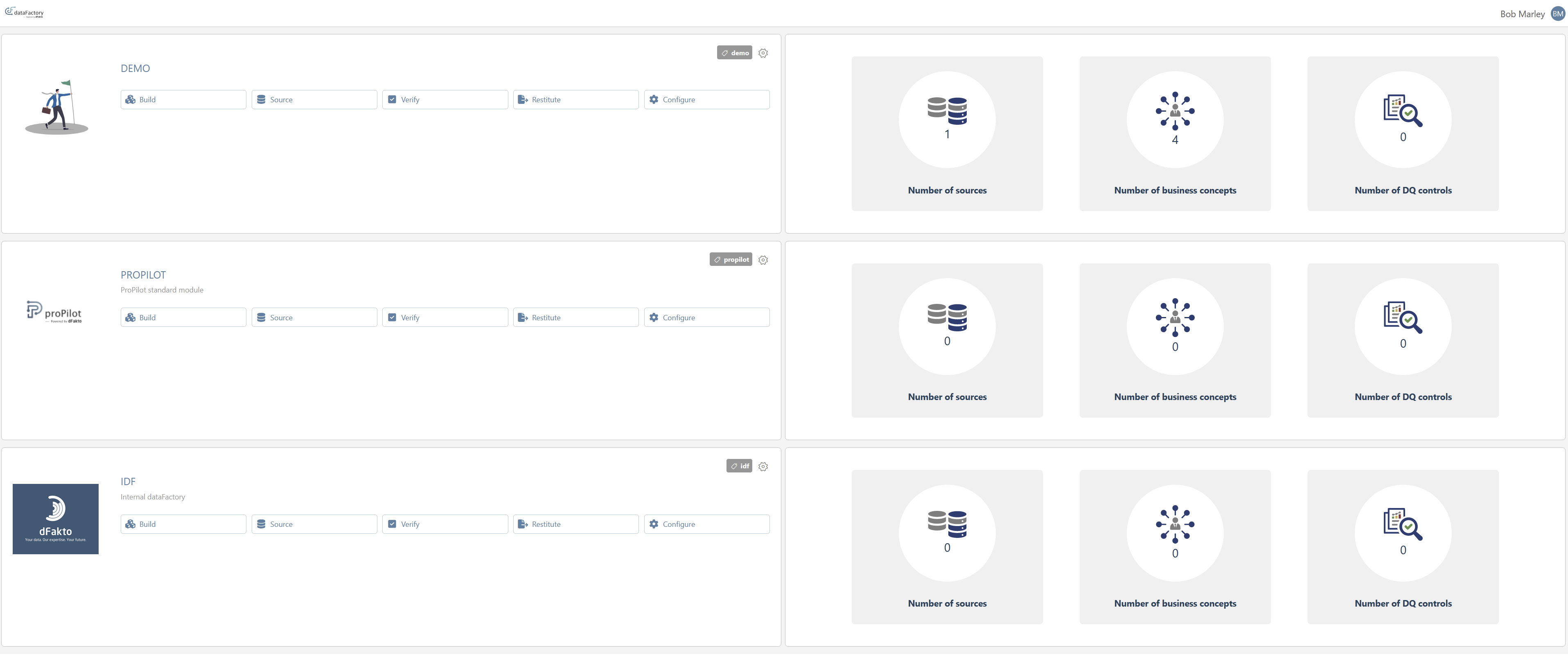
Once you log in to the application, you don’t start directly in a random project. You first arrive at the product’s homepage with the list of projects. This way, you will have a global view of your scope.
This page will evolve in the future to give you more insight into your projects.
🛰️ Navigation
The navigation has been completely reworked, with modules, submodules, and dynamic tabs.
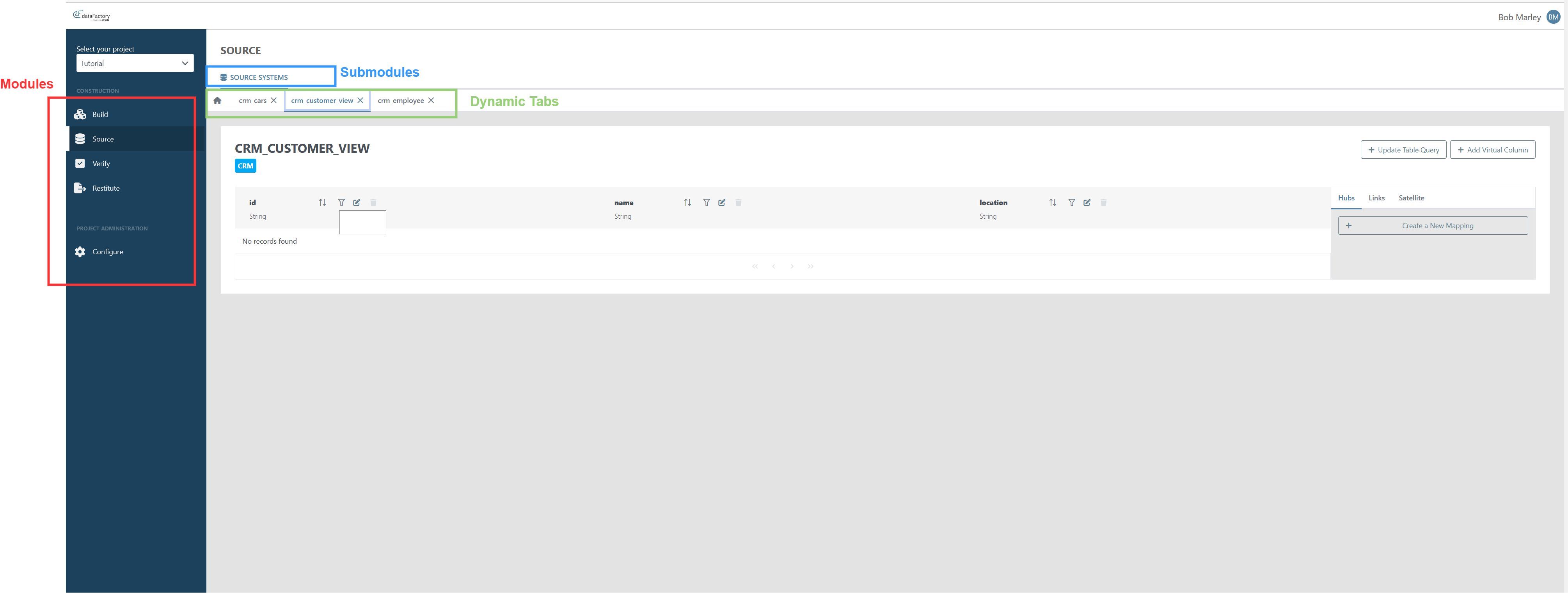
The new UI features a total of nine modules: Build, Source, Enrich, Verify, Distribute, Automate, Use, Explore, and Configure. Each of these modules represents a specific step in the construction or the usage of your dataFactory. You can now access everything you need for the current step within the module, eliminating the need to jump between different modules or external applications.
Once you enter a module, the submodules appear on the top of the view. The submodules on the left are specific to the current module, whereas the submodules on the right are used in different modules.
One of the most exciting features of this release is the ability to open multiple dynamic tabs based on your actions. This allows you to open multiple tabs and compare different objects easily, making it easier than ever to manage and transform your data.
⭐ Data Quality
We improved the user experience in the data quality module. The fields for the data quality tests have been rearranged to ease the comprehension of the required information.
Known limitation
Hubs and links lists
Even though we tried to migrate most of the existing views from metavault in this new product approach, there are two views that are not migrated yet: the list of hubs and the list of links. You can still manage those entities via the graph view (Build > Graph) or by using the metavault interface, which is still available.
The pit tables, which were accessible only from those lists, should be managed in metavault for the moment.
The content of those views will be reworked in a single submodule in the dataFactory product.
What’s next?
User management
One of the biggest missing features of the dataFactory is user management. We plan to tackle this improvement in the next release. With this feature, you will be able to control who has access to each module, and who can deploy new changes or read data on an environment.
Build - Entities
As explained earlier, we will rework the list of entities in a single submodule to ease access to the hubs, links, and satellites.
Components' version
|
Component |
Version |
|---|---|
|
Metavault |
1.7.1 🆙 |
|
States |
1.5.6 |
|
Workers |
1.5.0 🆙 |
|
UI |
1.0.0 🆕 |
Fix Versions
| Title | Release | Release Date | Status | UI Version | Metavault Version | States Version | Workers Version | Summary |
|---|---|---|---|---|---|---|---|---|
| Release note - beVault 3.9.1 |
3.9.1 |
Released |
1.11.2 |
5.2.0 🆙 |
2.3.0 |
1.11.2 |
|
|
| Release note - beVault 3.11.1 |
3.11.1 |
Released |
1.15.0 🆙 |
5.6.0 🆙 |
2.6.0 🆙 |
2.1.0 |
Add support for distinct endpoints for back-end and front-end components Minor bug fixing |
|
| Release note - beVault 3.9.7 |
3.9.7 |
Released |
1.11.2 |
5.3.2 🆙 |
2.3.3 🆙 |
1.12.1 |
|
|
| Release note - beVault 3.12.2 |
3.12.2 |
Released |
1.16.2 |
6.1.1 🆙 |
2.6.0 |
2.1.1 |
|
|
| Release note - beVault 3.9.6 |
3.9.6 |
Released |
1.11.2 |
5.3.0 🆙 |
2.3.2 🆙 |
1.12.1 |
|
|
| Release note - beVault 3.8.1 |
3.8.1 |
Released |
1.10.1 🆙 |
5.0.0 |
2.3.0 |
1.11.2 |
Source Module
Graph Editor
|
|
| Release note - beVault 3.10.1 |
3.10.1 |
Released |
1.13.1 🆙 |
5.4.0 🆙 |
2.4.0 |
2.0.0 |
Bux fixing and minor improvements |
|
| Release note - beVault 3.8.2 |
3.8.2 |
Released |
1.10.2 🆙 |
5.0.1 🆙 |
2.3.0 |
1.11.2 |
|
|
| Release note - beVault 3.9.5 |
3.9.5 |
Released |
1.11.2 |
5.2.4 🆙 |
2.3.1 🆙 |
1.12.1 🆙 |
|
|
| Release note - beVault 3.9.3 |
3.9.3 |
Released |
1.11.2 |
5.2.2 🆙 |
2.3.0 |
1.12.0 🆙 |
|
|
| Release note - beVault 3.9.2 |
3.9.2 |
Released |
1.11.2 |
5.2.1 🆙 |
2.3.0 |
1.11.2 |
|
|
| Release note - beVault 3.12.1 |
3.12.1 |
Released |
1.16.2 🆙 |
6.1.0 |
2.6.0 |
2.1.1 |
Fix an issue with the technical name of the satellite |
|
| Release note - beVault 3.9.4 |
3.9.4 |
Released |
1.11.2 |
5.2.3 🆙 |
2.3.0 |
1.12.0 |
|
|
| Release note - beVault 3.8.3 |
3.8.3 |
Released |
1.10.2 |
5.0.2 🆙 |
2.3.0 |
1.11.2 |
|