
We are thrilled to announce the release of beVault 3.10, bringing major new capabilities to our data vault automation tool. This version focuses on expanding platform support with Amazon Redshift compatibility, introducing centralized data store management in States, and delivering a modernized user interface across both Metavault and States.
Check out this release note to see what's new and stay tuned for new incoming releases in 2026 🚀
Data Stores in States
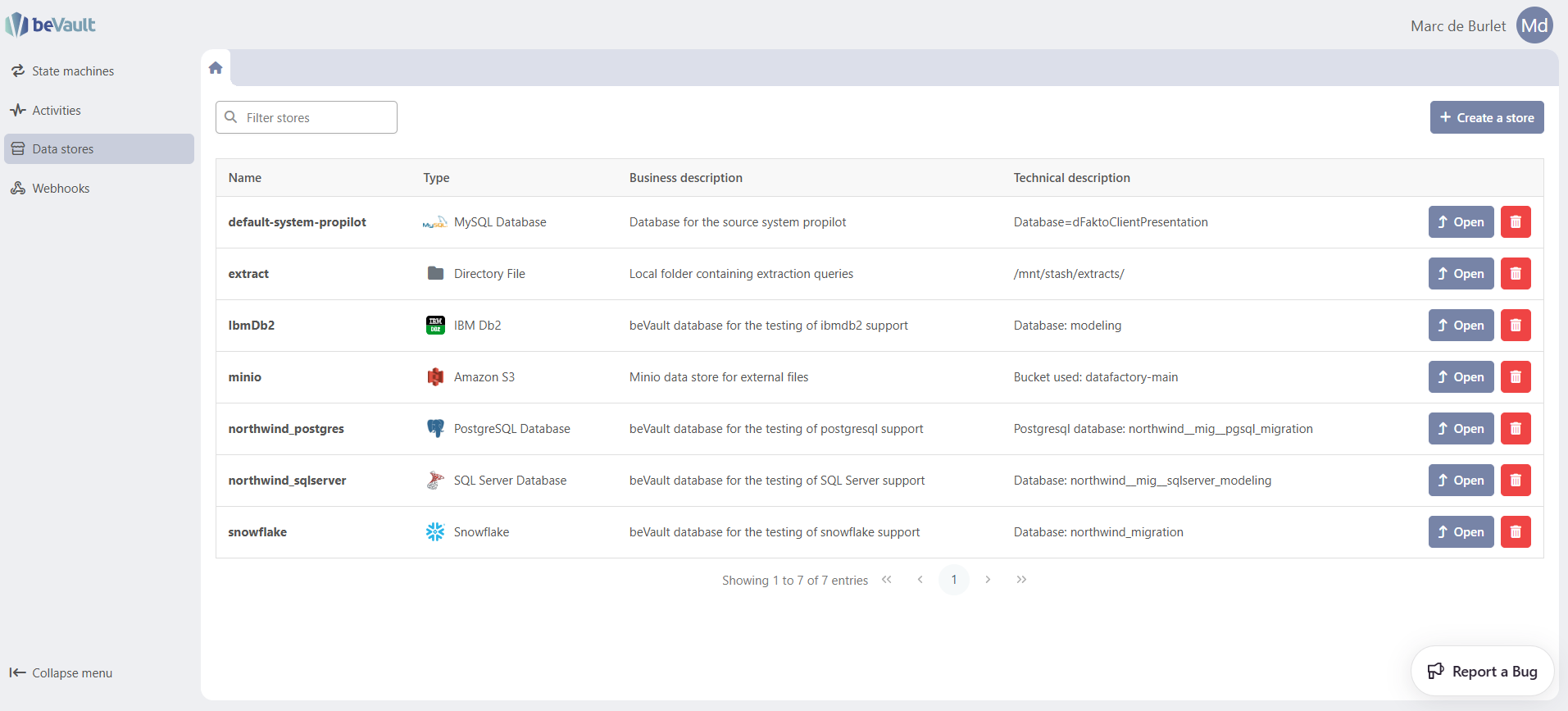
beVault 3.10 introduces centralized data store management directly within the States module. Data stores — your database connections and file system endpoints — can now be configured, tested, and managed from the States interface, instead of requiring static configuration during worker deployment.
This powerful addition streamlines operations and increases autonomy:
-
Configure stores from the UI: Create and manage connections to your databases and file systems directly from States, without server access
-
Test connections: Validate your store configurations with a built-in connection test before using them in workflows.
-
Full lifecycle management: Create, update, and delete store configurations as your data landscape evolves
-
No migration required: Existing local worker configurations remain fully supported — adopt the new centralized approach at your own pace
Support of Amazon Redshift

beVault is now compatible with Amazon Redshift as a target database platform. This feature allows you to design your Data Vault 2.0 model in beVault and generate code fully compatible with Redshift.
UX/UI Rework
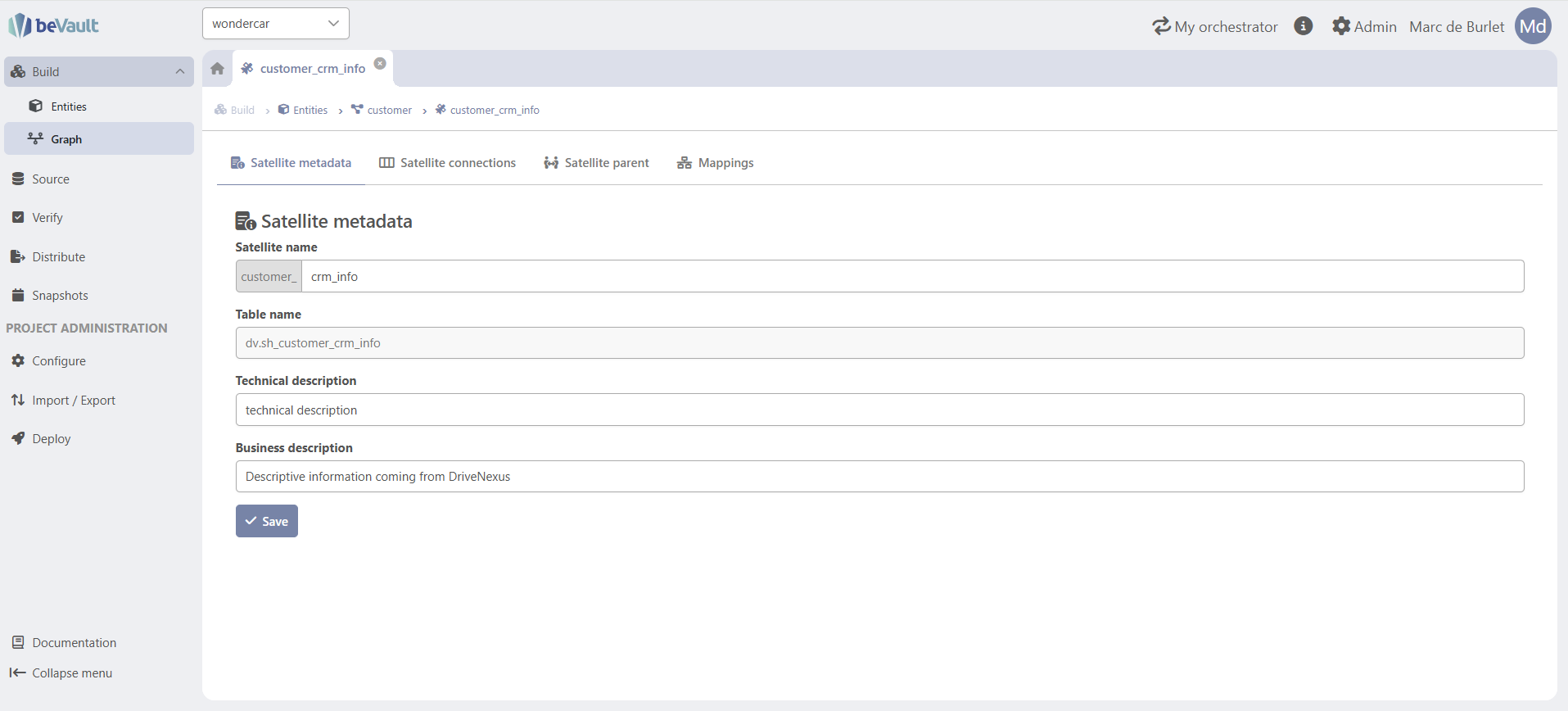
Both the Metavault and States user interfaces have been reworked to modernize the application and improve the overall user experience:
-
New menu layout in Metavault: Redesigned sidebar, topbar, and content container for a cleaner, more efficient workspace
-
New menu layout in States: Matching redesign for a consistent experience across the platform
-
More working space: Optimized layouts provide more room for your data models, workflows, and configurations
-
Improved navigation: Streamlined access to modules and features across the application
This is the first step in our UI modernization journey — more enhancements for States are coming in upcoming releases.
Python Library for Custom Workers
beVault 3.10 introduces bevault-workers-python, an open-source Python library that makes it easy to build your own custom workers for beVault's orchestrator. This unlocks unlimited extensibility: if your data pipeline requires a task that isn't covered by beVault's built-in workers, you can now create it yourself in just a few lines of Python.
The library handles all the operational complexity — Workers' activity registration, task polling, heartbeats, and store configuration — so you can focus entirely on your business logic:
-
Simple development model: Subclass
BaseWorker, implement ahandlemethod, and your custom worker is ready to run alongside beVault -
Automatic store integration: Access your data stores (databases, file systems) configured in States directly from your custom workers — including stores managed via the new centralized store management
-
Production-ready deployment: Package your workers as Docker containers and deploy them on the same infrastructure as beVault, or on adjacent nodes — keeping lifecycle management separate but operationally aligned
-
Open source: Available on GitHub and PyPI
👉 Learn how to create your own custom workers
List of changes
Data Store Management
-
Centralized store management APIs in States and Workers
-
To enable this feature do not forget to use the appropriate configuration on Workers (enableDfaktoExtensions)
-
-
Configure data stores (databases, file systems) from the States interface
-
Delete store configurations from the States interface
-
Test store connections before using them in workflows
Redshift Support
-
Full Amazon Redshift support in the Data Vault engine for code generation and deployment
UX/UI
-
New menu layout and navigation rework for Metavault's UI
-
New menu layout and navigation rework for States UI
-
Added a contextual breadcrumb across all modules to provide clear hierarchy and enable direct navigation to parent elements (e.g., navigate from a satellite to its parent hub or link, from a staging table to its source system or data package, from an information mart script to its information mart, or from an execution to its state machine)
-
Verify module: replaced entity type radio buttons with choice buttons for consistency across the application
-
Source module: added title to the data package creation modal
Bug fixes
-
Fixed Metavault UI health check failing
-
Fixed infinite loading in Group Management when adding a user without selecting one
-
Fixed API Keys project assignation failing on subsequent modifications
-
Fixed schedule input being erased when updating a schedule in States
-
Fixed staging table columns not refreshing when updating a SQL script
Components' version
|
Component |
Version |
|---|---|
|
UI Version |
1.13.0 🆙 |
|
Metavault Version |
5.3.3 🆙 |
|
States Version |
2.4.0 🆙 |
|
States UI Version |
1.5.0 🆙 |
|
Workers Version |
2.0.0 🆙 |
Fix Versions
| Title | Release | Release Date | UI Version | Metavault Version | States Version | States UI Version | Workers Version | Summary |
|---|