
This page groups general concepts relevant to Metavault and its API together. Out of convenience, when a concept is used on a large majority of calls, it is explained here instead of on every page.
API version
This documentation is only valid for the latest stable version of Metavault. Please refer to the release notes of beVault to check that you are using the latest version.
API routes
URL prefix
In this documentation, the API routes are the ones the Metavault project exposes on its HTTP port. They always start with /api (except health checks and metrics, but that is out of scope). If you send an HTTP request to Metavault with another prefix, chances are that you’ll get a 404 Not Found.
A correct URL would look something like this:
GET http://host:port/api/...
As Metavault is usually deployed as part of the beVault product, calls typically go through a reverse proxy (like Nginx), and a prefix and/or encryption may be applied. For example, dFakto usually deploys Metavault behind a /metavault/ prefix.
The correct URL would then look like this:
GET https://host:port/metavault/api/...
Ask the person responsible for the deployment of beVault for the correct route prefix to use.
“ProjectId” URL parameter
API calls that are scoped to a specific project inside Metavault will take a Project Id parameter as part of their path parameters. A typical call looks like this:
/api/projects/{projectId}/...
You can make use of the Metavault API - Get project list API call to retrieve the correct id. it is typically a formatted “GUID” value like this:
a88f74e314fe4a326ce78aee7702d292
This parameter will not be detailed in single API call page details.
Authentication and authorization
Connection to the API
Most API calls require an authenticated user or an API token. There are three ways to authenticate on Metavault:
-
API token: recommended This method requires an administrator to create an API token and to assign correct access rights. You can then add the following HTTP header to your calls to request the API (replacing the token):
Authorization: ApiToken mvpat-5t+lkslkdfjnsdfb092349waebranrbn5BHKJVNBN=
Note: There should be one single space betweenApiTokenand the token. -
Oidc Bearer token: This is the default method and is the “classical” way the front-end app connects to Metavault. It authenticates against an SSO provider, which then issues short-lived access tokens. They are forwarded through the Authorization HTTP header:
Authorization: Bearer eyJhbGciOiJSUzI1NiIsInR5cCIgOiA...PcB1cF9OHwkqMoseMgb26ii-Dwg -
Explicit user id HTTP header: Do not use in production. This method must be activated explicitly, because it bypasses authentication. Configure a UserIdHeader and set that HTTP header to the id of the user you want to impersonate. Example:
X-Metavault-Impersonate-User: admin@example.org
Access rights
Several administration API calls deal with access rights. Users, Groups and Api Tokens, most notably. Access rights in the API are always composed of two parts.
-
The isAdmin boolean, which configures global administration rights over Metavault and allows you to manage administrative objects.
-
Explicit project access rights that reflect particular access rights on a project.
Global administration rights do not automatically give rights to specific projects. They have to be assigned explicitly, per project.
Here is an example of a JSON format of the particular access rights in the API:
{
  "projects" : [
    {
      "technicalName": "my_project",
      "modules": [
        {
          "name": "build",
          "permissions": [{ "name": "read" , "allowed": true },
                          { "name": "write", "allowed": true }]
        },
        {
          "name": "source",
          "permissions": [{ "name": "read" , "allowed": true }]
        },
        {
          "name": "verify",
          "permissions": [{ "name": "read" , "allowed": true },
                          { "name": "write", "allowed": true }]
        }
      ],
      "environments": [
        {
          "name": "my_database",
          "permissions": [{ "name": "read"   , "allowed": true },
                          { "name": "execute", "allowed": true },
                          { "name": "deploy" , "allowed": true }]
        }
      ]
    }
  ]
}
|
Field |
Description |
|---|---|
|
projects |
The list of explicit administration rights per project. |
|
projects.technicalName |
The technical name of the project for which the access rights are defined. |
|
projects.modules |
The list of access rights per module. |
|
projects.modules.name |
The name of the module. At the time of writing, the list of names is build, source, verify, distribute and configure. |
|
projects.modules.permissions |
The list of permissions, or “allowed actions” on the module. |
|
projects.modules.permissions.name |
The name of the permission. Read or write. |
|
projects.modules.permissions.allowed |
A boolean set to true. (allowed). To deny, simply do not include the permission. |
|
projects.environments |
The list of environments of the project with specific accesses on them. |
|
projects.environments.name |
Name of the environment. |
|
projects.environments.permissions |
The list of permissions, or “allowed actions“ on the environment. |
|
projects.environments.permissions.name |
The name of the permission. Read, execute, or deploy. |
|
projects.environments.permissions.allowed |
A boolean set to true. (allowed). To deny, simply do not include the permission. |
API endpoint documentation labels
In this documentation, a collection of LABELS are used in call descriptions for convenience. Here is an exhaustive list of the ones that are used and what they mean.
-
ANONYMOUS : No authorization is needed to access this call. While authenticated calls would return an
401: Unauthorizederror for calls that are not authenticated, this one will succeed. -
NO LICENSE : All API calls usually require a valid active license to be loaded in Metavault, otherwise they return
403: ForbiddenAccess denied: Invalid license.The calls with this tag remain accessible when no valid license is loaded. -
DEPRECATED : This endpoint (or a particular feature of the endpoint) will be removed in the next major version.
-
0.0.0 TBA : This endpoint (or a particular feature of the endpoint) was added or improved in the 0.0.0 version (The numbers will reflect a Metavault version), or will be part of a TBA upcoming non-bugfix release. A comment will be enclosed to give more details.
-
0.0.0 : This endpoint (or a particular feature of the endpoint) was removed in the 0.0.0 version (The numbers will reflect a Metavault version). A comment will be enclosed to give more details. At some point, this label may be removed, as this documentation does not aim to keep an exhaustive history of deprecated features.
Errors
To handle errors on API calls, Metavault follows the following general rules.
-
Errors that stem from an incorrect use of the API return an HTTP error code between
400and499. The response body will then contain a JSON with a singleerrorfield. This is a string with details about the error. For example:
{"error":"There is already a hub or link with name MyHub"}
Some codes are well-known for certain types of situations:-
400: Generic error that is used for various errors. -
401: Invalid auth: See Metavault API - General concepts | Authentication and authorization -
403: Access error that is used on an invalid license or missing access rights. -
404: Used when trying to access an object that does not exist.
-
-
Errors that stem from an unexpected internal error return an HTTP error code between
500and599. The response body is an empty JSON. Check the application's logs for additional details. If you submit a bug report, make sure to include the logs of your instance.
Calls that do not follow these rules, or that have more details about the errors they implement will be documented on that specific page.
Paging, sorting and filters
Most API calls that return a collection of objects implement a form of paging and a way to filter out specific objects. One generic method is used on these calls, which is documented here. API calls that make use of this method link back to this documentation snippet. The ones that do not comply with the general rule listed here will have specifics detailed on their own documentation page.
Paging affects how many objects are returned, and at which index of the complete collection objects are fetched from. Metavault implements simple index-based paging.
Paging goes hand-in-hand with sorting, which allows you to choose one or several columns to sort over, in ascending or descending order. A default sort order is applied on all collections (often the “Name“ of the object, if applicable.)
Finally, filters allow you to specify some rules about which items to include in the complete set of objects of the endpoint. See the section Filters for a complete breakdown of filter expressions.
Query parameters
The way to control paging, sorting and filtering is through query parameters. The following table explains their use. All of these parameters are optional.
|
Parameter |
Type |
Default |
Description |
Example |
|---|---|---|---|---|
|
limit |
integer |
10 |
Number of results to return |
25 |
|
offset |
integer |
0 |
Pagination offset |
50 |
|
sort |
string |
Depends on the type of object. Usually, the “name“. |
A comma-separated list of object property names used to sort the collection. If arguments are prefixed by a dash “-“, the sort will be descending instead of ascending. |
groupId,-name |
|
filter |
string |
|
Filter criteria. See the section “Filters“ below for usage details. |
status = active AND id~name contains platypus |
Response
The response will contain the following fields for paginated results.
{
    "total": 37,
    "index": 3,
    "limit": 10,
    "sort": [
        "displayname",
        "name"
    ],
    "filter": "displayName contains alpha"
}
|
Field |
Type |
Description |
|---|---|---|
|
total |
integer |
The total amount of existing objects that respect the given filters. |
|
index |
index |
The pagination offset used in the response, which should be the requested index. |
|
limit |
integer |
The maximum amount of returned objects, which should be the requested limit. |
|
sort |
array of string |
The list of columns used to sort the collection. The first argument defines the initial sort, the second argument defines the applied sort in sub-groups that have the same value in the first column, and so forth. |
|
filter |
string |
The filter expression used to select a subset of objects. |
Filters
Format
The content of the Filter parameter follows the grammar below with:
-
field-name: the alphanumerical name of the field in the object to filter and, -
value: a constant value to use in the filter.
filter-parameter
         ::= filter ( ' AND ' filter )*
filter   ::= field-name ( '~' field-name )* ' ' operator ' ' value
operator ::= 'eq'  | 'equal'              | '='
           | 'neq' | 'notequal'           | '!=' | '<>'
           | 'gt'  | 'greaterthan'        | '>'
           | 'lt'  | 'lessthan'           | '<'
           | 'gte' | 'greaterthanorequal' | '>='
           | 'lte' | 'lessthanorequal'    | '<='
                   | 'contains'
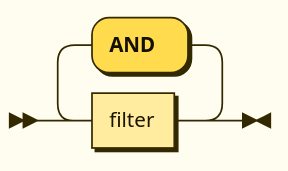
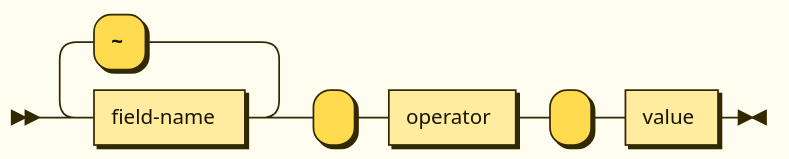
Keywords and field names are case insensitive.
Usage
Filters are combined with the AND operator, meaning an object needs to pass all filters to be selected. A filter is composed of one field name, or several field names joined with a tilde ~, one operator and a value. When a filter has several joined fields, the filter applies to all of them and only one needs to pass. The value must be a constant literal.
Here is the list of operators and their uses:
|
Operators |
Applicable to type |
Description |
|---|---|---|
|
|
string, integer, boolean |
Whether the field and the constant are equal |
|
|
string, integer, boolean |
Whether the field and the constant are not equal |
|
|
integer |
Whether the field is <operator> the constant value. |
|
|
||
|
|
||
|
|
||
|
|
string |
Whether the field contains the constant (as a substring). |
Example
Here is an example of a filter applied to a made-up concept. It looks for a user in team 4 that has the string “Matthew“ in either their first or their last name (or both):
TeamId = 4 AND firstname~lastName contains Matthew
Note that there is no white space around the tilde '~' for multi-field filters.
Links and embedded objects
Structure
All API calls may return a special field _links as part of their response body (and most do).
This JSON object is a collection of HTTP links that point towards related API calls. The _links collection of an API call will always contain the link self which points to the call itself. The links may indicate which HTTP method can be used on said link.
The links that appear in the collection may vary depending on:
-
The access rights of the calling agent. Links may reflect what the caller has access to. For example, if the caller has read-only access, only the “GET“ method may be advertised using the
methoddictionary, or the links may not be included whatsoever. -
The state of the object. The links may only appear if relevant to that particular object. For example, types that have “children“ usually have a link pointing towards those children, but, if the object in question has none, it may omit that link.
The valid list of links is documented on the specific API call pages.
Here is a link structure example (URLs are shortened placeholders here):
"_links": {
    "self": {
        "href": "http://host:port/api/..."
    },
    "hub": {
        "href": "http://host:port/api/...",
        "method": [
            "GET",
            "POST"
            ]
    },
    "satellite": {
        "href": "http://host:port/api/...",
        "method": [
            "GET"
            ]
    },
    "image": {
        "href": "http://host:port/api/..."
    }
}
|
Field |
Description |
|---|---|
|
_links.<link_name> |
Name (or “handle“) of the link. This is expected to represent the usage of this link, relative to the concept of the current API call. A special handle that is always present is self which points to the current API call itself. This name may change over time, concepts may appear and disappear with API evolution, and are not considered breaking changes given their dynamic nature. To guarantee stability over new minor versions, one should consider using API calls directly. |
|
_links.<link_name>.href |
The actual URL of the link. |
|
_links.<link_name>.method |
Either null, or a list of valid HTTP methods on the given URL. If null, no specific method is specified, so they are potentially all valid. |
Embedded objects
It is possible to request for a link on an API call to be expanded. That means that the URL endpoint will be called by the back-end and added to the response of the initial API call. This is done using the expand query parameter. The name of one or several links can be added to request calls be made to get their response.
https://host:port/api/.../object?expand=satellite
Additionally, the client must indicate it expects this expanding behavior to occur by adding the following value to the Accept HTTP header:
Accept: application/hal+json
The corresponding result will be added to the API response in the special _embedded entry of the response JSON body. Here is an embedded objects dictionary example:
"_embedded": {
  "satellite": {
    "name": "mysat",
    "poll": 3
  }
}
To fetch the embedded results, the expand keyword triggers an actual network call from the back-end to resolve the link that the name in the parameter points to.
-
This relies on correct network and firewall behavior. The URLs in the links should be resolvable from the point of view of the back-end app.
-
This may have performance impacts that are a function of the delay caused by this call.
Some heavily-used links are short-circuited by the back-end app and are resolved directly by it. These calls do not trigger additional network calls. However, this behavior is not to be relied on, and can change across minor versions.